The ZWO Seestar S50 for nursing home residents is the most practical smart telescope choice in 2026 for patio-room stargazing. Weighing under 6 pounds, app-controlled, and able to stack live images onto a tablet from a wheelchair-accessible height, it removes nearly every physical barrier traditional telescopes place between older adults and the night sky. This guide explains why the Seestar S50 fits assisted-living and skilled-nursing settings, how to set one up on a covered patio, and which alternative Celestron computerized telescopes activity directors should consider when residents want a richer eyepiece experience or a sharper view of the planets through a covered screen porch.
Why the Seestar S50 fits patio-room astronomy programs
Traditional Dobsonians and equatorial mounts force a viewer to bend at the eyepiece, sometimes kneel, and reach across a tripod to focus. None of that works for a resident in a wheelchair, walker, or recliner. The Seestar S50 sidesteps the problem entirely: it points itself, focuses itself, and pipes a live, brightening image to a phone or tablet over Wi-Fi. A resident watches the Orion Nebula bloom on the same screen they use for FaceTime with grandchildren, with no neck strain and no need to step outside the patio threshold.
For activity directors evaluating the zwo seestar s50 for nursing home residents, three features matter most. First, the all-in-one design — telescope, mount, filter, and camera in one 5.5-pound unit — fits inside a single closet shelf and is carried out with one hand. Second, the app's plate-solving means staff do not need to know constellations; tap "Moon" or "Andromeda" and the scope slews there. Third, the built-in light-pollution filter pulls deep-sky objects out of the sky glow that surrounds most senior-care campuses, where exterior security lighting is non-negotiable.
Setting up a patio-room stargazing session
A covered patio room is usually the best venue. Open the screen door or roll the resident to the threshold so the telescope can see at least a strip of sky above the eave-line. The Seestar's built-in tripod sits on any flat surface — a portable table works fine — and the unit levels itself during the 60-second alignment routine. Staff need only:
- Plug the scope in to charge during the day (battery life is roughly six hours, more than enough for an evening program).
- Open the Seestar app on a shared tablet and let it auto-connect over the unit's own Wi-Fi hotspot.
- Pick targets from the app's tonight's-best list — typically the Moon, Saturn, Jupiter, the Pleiades, or a bright nebula depending on season.
- Hand the tablet to residents and let them tap through the catalog.
Because the live-stacking image brightens over 30 to 120 seconds, residents see something dramatic happen on screen — the difference between a faint smudge and a recognizable galaxy — which keeps engagement high even among residents with shorter attention windows or cognitive decline.
When a Celestron computerized telescope is the better choice
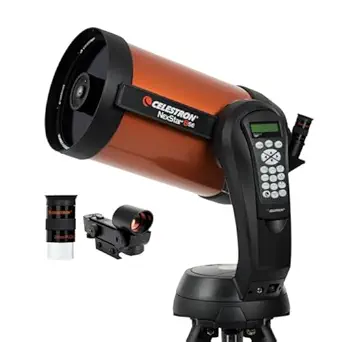
Some residents — particularly retired engineers, former amateur astronomers, or anyone who remembers the Apollo era — want to actually look through an eyepiece. For those programs, a Celestron NexStar Schmidt-Cassegrain is the right complement to the Seestar. The NexStar line shares the Seestar's GoTo automation (the mount slews to any object after a quick alignment) but delivers a brighter, sharper, real-time optical view of the Moon and planets that smart telescopes cannot match. Pair one with a wheelchair-accessible eyepiece height by setting the tripod legs low on a stable patio surface.
Celestron NexStar 8SE — best optical companion for a memory-care or assisted-living patio
The 8-inch aperture pulls in roughly 75% more light than a 6-inch, which translates to noticeably brighter views of Saturn's rings and the cloud bands on Jupiter — exactly the targets that prompt the loudest reactions from residents who remember the space race. The single-arm fork mount means there is only one knob to manage, and the SkyAlign routine completes in under five minutes. Check the Celestron NexStar 8SE on Amazon.
Celestron NexStar 8SE with NexYZ smartphone adapter kit — for residents who want photos to share
This bundle adds a three-axis phone mount that clamps to the eyepiece, letting a staff member snap a quick lunar photo a resident can text to family the same evening. The included AC adapter eliminates battery anxiety during longer programs. See the NexStar 8SE smartphone kit on Amazon.
Celestron NexStar 6SE — the lighter, easier-to-store alternative
If staff will be carrying the optical tube from a storage closet to the patio every session, the 6-inch is meaningfully easier to manage: about 30 pounds total versus 50 for the 8SE. The views of the Moon and brighter planets are still excellent, and the same single-fork mount and SkyAlign routine apply. View the Celestron NexStar 6SE on Amazon.
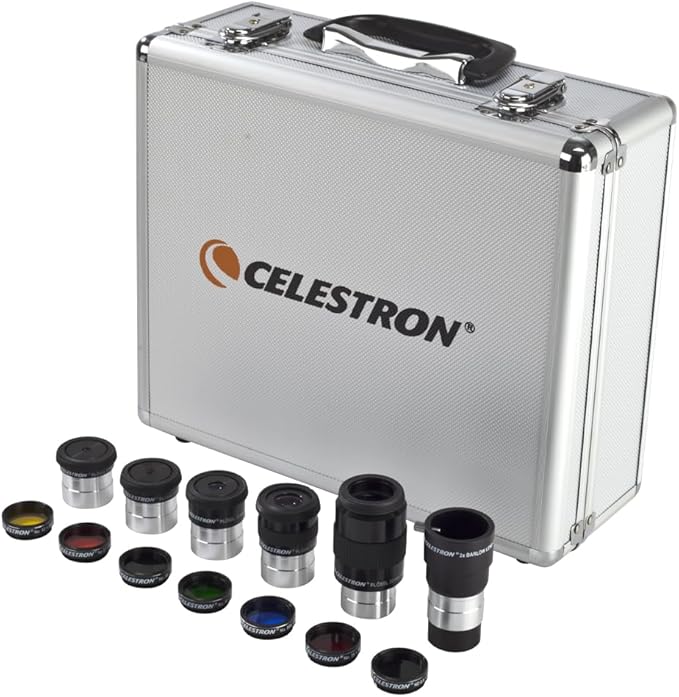
Celestron NexStar 8SE with eyepiece and filter kit — for facilities running monthly astronomy nights
The bundled filter kit includes a Moon filter (essential — the full Moon is uncomfortably bright in an 8-inch without one) and color planetary filters that bring out the cloud belts on Jupiter and the polar cap on Mars. Worth it if the same scope will be used dozens of times a year. Check the NexStar 8SE filter-kit bundle on Amazon.
Comparison: Seestar S50 versus Celestron NexStar options for senior-care use
| Feature | ZWO Seestar S50 | Celestron NexStar 6SE | Celestron NexStar 8SE |
|---|---|---|---|
| Total weight | ~5.5 lb | ~30 lb assembled | ~50 lb assembled |
| Setup time | ~2 minutes | ~10 minutes | ~10–15 minutes |
| View method | Live image on tablet/phone | Eyepiece (optical) | Eyepiece (optical) |
| Wheelchair-friendly | Excellent (screen view) | Possible with low tripod | Possible but heavier to position |
| Best targets | Nebulae, galaxies, Moon | Moon, planets, brighter clusters | Moon, planets, fainter deep-sky |
| Staff training needed | Minimal — tap a target | Brief alignment training | Brief alignment training |
| Storage footprint | Single shelf | Closet corner | Closet corner, two pieces |
Practical considerations for assisted-living programs
The biggest operational advantage of the zwo seestar s50 for nursing home residents is that one staff member can run a session for a group. With the tablet mirrored to the patio-room television (most facilities already have Apple TV or Chromecast in common areas), an entire wing can watch the Moon's terminator inch across Tycho crater while a single resident at a time steers the scope. That group dynamic is impossible with an eyepiece scope, where one person looks while everyone else waits.
Wind matters more than you might expect on a covered patio. The Seestar is light enough that gusts above about 15 mph cause vibration in the live image. Place it against an interior wall whenever possible, and use the included tripod rather than balancing the unit directly on a railing. For windier climates, a low table inside the screen door — pointed out through an open section — works well.
Battery management is the other practical detail. Keep a labeled charging shelf in the activities office so the scope is always at full charge by sundown. The same shelf should hold the tablet and a backup phone, since residents occasionally want to keep watching after the primary tablet's battery runs low. For longer programs or summer outdoor movie-and-stargazing events, a small USB-C power bank extends runtime to overnight.
Building a monthly astronomy program around the Seestar
Activity directors who have run successful Seestar programs in 2026 report a few common patterns. Anchor each session to a specific bright object — the Moon at first quarter, Saturn at opposition, the Orion Nebula in winter — and pair it with a short reminiscence prompt. Residents who lived through the 1969 Moon landing will often share vivid memories once they see Tycho or the Sea of Tranquility on the screen. Print a one-page handout with the target's name, distance, and one historical fact; residents who cannot attend the patio session can still flip through it at breakfast.
If your facility has both Seestar and Celestron units, alternate which scope leads each month. The Seestar excels at galaxies and nebulae (which look like nothing through a 6- or 8-inch eyepiece in light-polluted skies). The Celestron NexStars excel at the Moon and planets, where the live optical view through an eyepiece still beats any smart-telescope screen for sheer presence. For more on pairing instruments, see our smart telescopes vs traditional telescopes comparison and our 2026 guide to the best telescopes for seniors.
Accessibility details worth checking before purchase
Before ordering any unit for a care facility, verify three things with your administration. First, confirm Wi-Fi policy — the Seestar creates its own hotspot, which most facility IT departments allow, but a few require an exception. Second, confirm patio-room sightlines; a south-facing patio captures most of the ecliptic and is ideal, while a north-facing patio limits you mostly to the Moon and circumpolar targets. Third, confirm that the activity-room television supports screen mirroring, since group viewing dramatically multiplies the value of a single scope.
Hearing-impaired residents benefit from the visual nature of smart-telescope programs because the experience is entirely image-driven; no narration is required. Residents with macular degeneration often see screen-based images more clearly than eyepiece views, because the tablet's brightness and contrast can be adjusted. For residents with dementia, the slow, watchable brightening of a live-stacked image tends to hold attention longer than a static photograph would.
Frequently Asked Questions
Is the ZWO Seestar S50 safe to use indoors looking out through a screen door?
The Seestar works best with a clear sightline, but pointing it through an open section of a patio-room screen door is acceptable for casual viewing. Screens will slightly soften the image and cut a small amount of light, so for the sharpest results — especially on planets — open or remove the screen panel facing the scope. Never point it through a closed window pane; double-glazed glass distorts the image significantly.
Can a resident with limited hand mobility actually operate the Seestar app?
Yes, in most cases. The app uses large, clearly labeled buttons and a tap-to-go-to interface that works well with a stylus, an iPad accessibility setting, or a staff member's guided hand. Residents with severe tremor often prefer that staff handle target selection while the resident watches the screen and asks for the next object.
What is the best night sky target for a first stargazing session in a nursing home?
The Moon between first quarter and gibbous phase is unbeatable for a first session. Craters are dramatic along the terminator, the image is bright enough to need no patience, and almost every resident has a personal memory tied to it. Saturn is a close second when it is up — the rings produce audible reactions almost every time.
How does the Seestar S50 compare to the Celestron NexStar 6SE for senior programs?
They serve different goals. The Seestar is dramatically easier to set up and far better for galaxies and nebulae in light-polluted skies. The 6SE delivers a genuine optical eyepiece experience that some residents specifically want, and its planetary views are sharper. Many facilities ultimately own both. For the broader trade-off, see our computerized telescope buying guide.
Does the Seestar S50 work in a city with heavy light pollution?
Yes, much better than a traditional telescope. Its built-in dual-band filter cuts the orange sodium-vapor and white LED glow that washes out nebulae from urban patios, and the live-stacking process accumulates faint signal across many short exposures. The Moon and planets are essentially unaffected by light pollution at any aperture.
What is the budget difference between a Seestar S50 program and a NexStar 8SE program in 2026?
The Seestar S50 typically lands at a meaningfully lower price than a NexStar 8SE bundle, especially once you add eyepieces, a power tank, and filters to the Celestron. For most facilities running an entry-level monthly program, the Seestar offers the best cost-per-resident-engaged. For facilities with a dedicated astronomy volunteer, the NexStar's long-term value is higher.
How long does a typical patio stargazing session last?
Plan for 30 to 45 minutes. That is long enough to view three or four targets — say the Moon, Saturn, the Pleiades, and the Orion Nebula on a winter evening — without exhausting residents or running into late-evening medication routines. Sessions stretched past an hour see noticeably reduced engagement except among the most enthusiastic participants.
Key Takeaways
- Choosing the right zwo seestar s50 for nursing home residents means matching capacity and output ports to your actual devices
- Always check actual watt-hours (Wh), not just watts — runtime depends on Wh, not peak output
- Also covers: seestar s50 senior living astronomy
- Also covers: smart telescope for elderly assisted living
- Also covers: seestar s50 patio room stargazing
- Compare price-per-Wh across models to find the best value for your budget